CFD · Computational fluid dynamics

Conjugate heat transfer (CFD)

Heat moving through solid parts and the air around them, solved as one problem: how hot each part gets, where the heat comes from, and what a design change does to it.

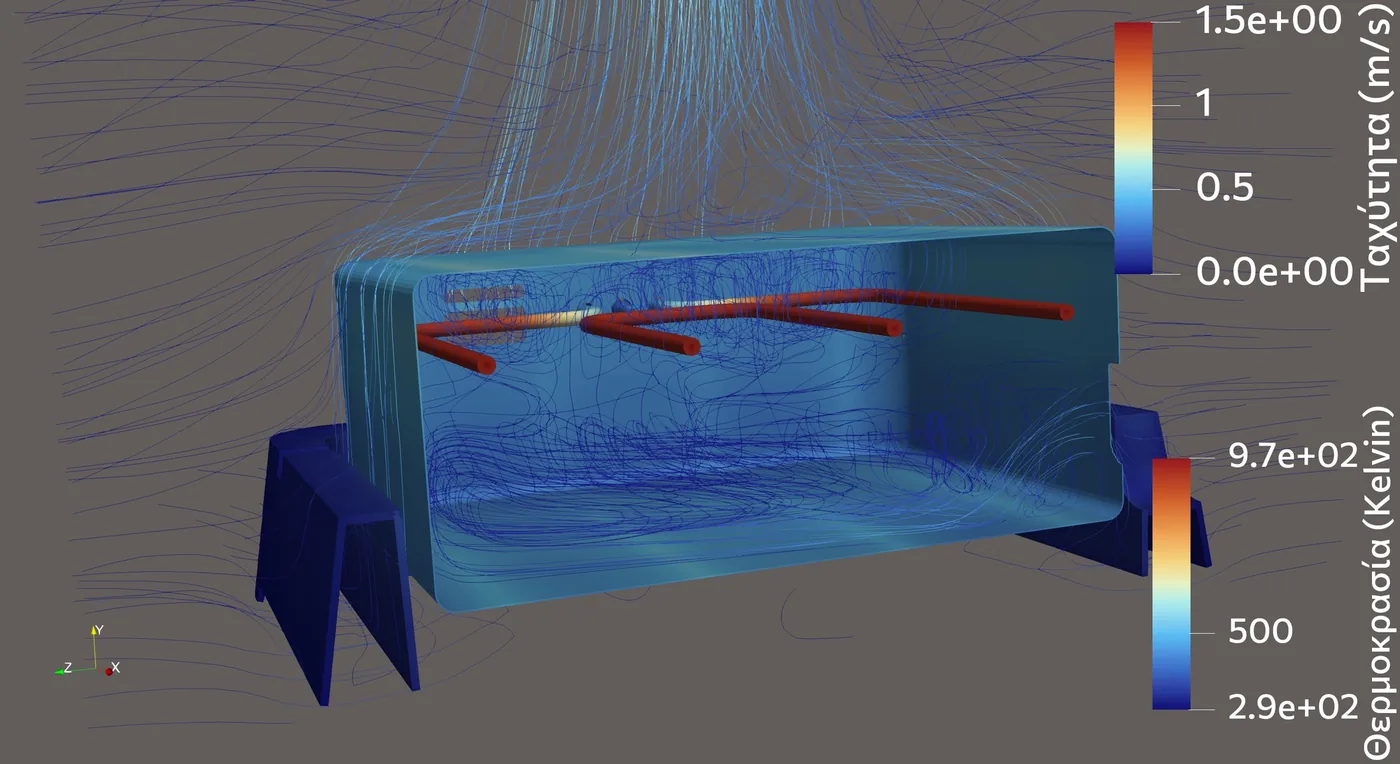
Section through an electric grill: heating element, wall temperatures and air circulation inside and above it
What it covers

When the temperature of a part depends on everything around it.

In an appliance, an enclosure with electronics or a heated device, heat leaves the source by radiation, warms the air, conducts through metal and reaches the plastic parts by several paths at once. A heat transfer coefficient from a handbook cannot describe that. Conjugate heat transfer (CHT) solves conduction in the solids, convection in the air and radiation between surfaces together, with no empirical coefficients at the interfaces.

  • Temperature of every part
  • Heat balance: where the power goes
  • Heat loads on plastic parts
  • Natural convection and hot plumes
  • Radiation between surfaces
  • Heating curves from a cold start
  • Sensor and thermostat readings
  • Effect of a design change

Typical questions

  • Will this plastic part stay below its continuous-use temperature?
  • By which path does the heat reach it: radiation, hot air or a metal contact?
  • Why does the thermostat or sensor read lower than the air around it?
  • Which material, gap or position solves the problem, before a new mould is made?
  • How long does the device take to reach its operating temperature?
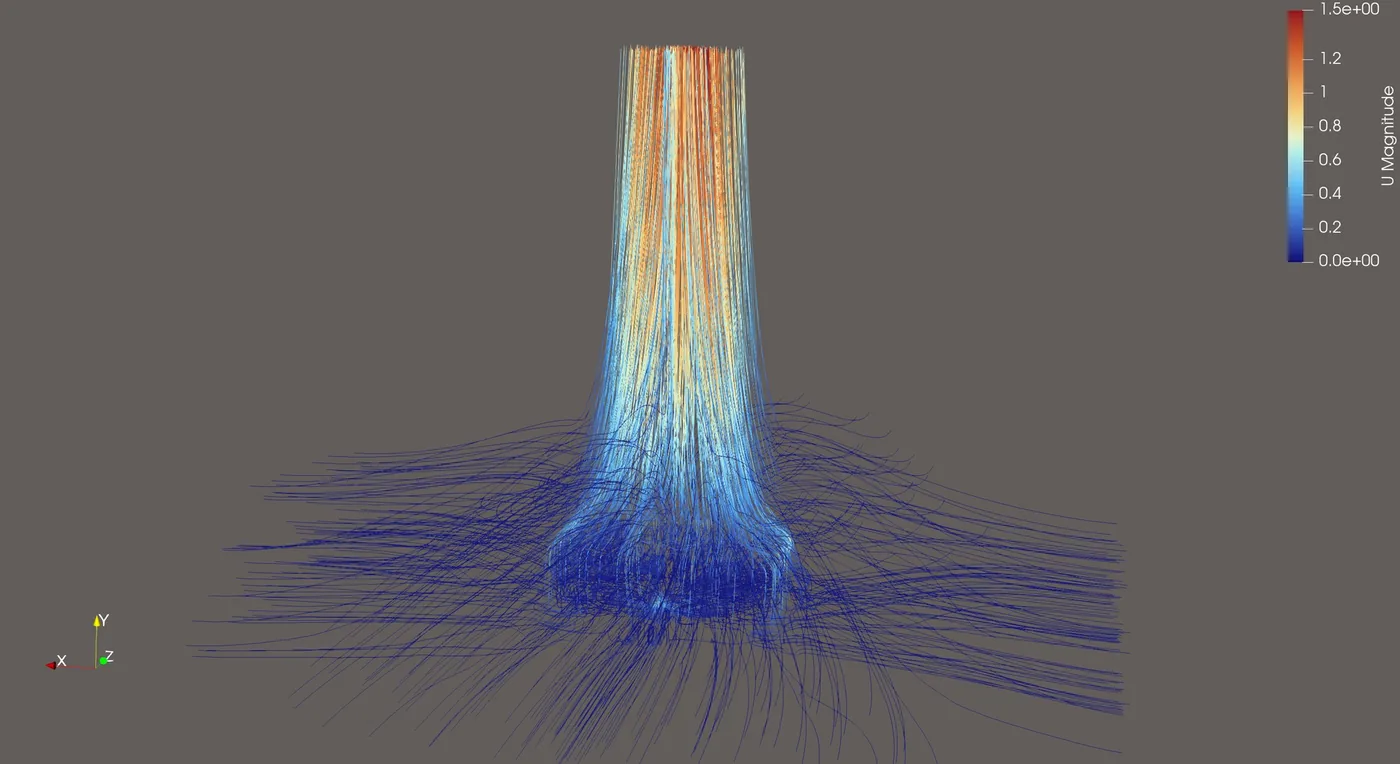
Streamlines of the hot plume rising above an appliance, coloured by velocity
The hot plume above the appliance: room air is drawn in from the sides and underneath, and carries away almost half of the heat.
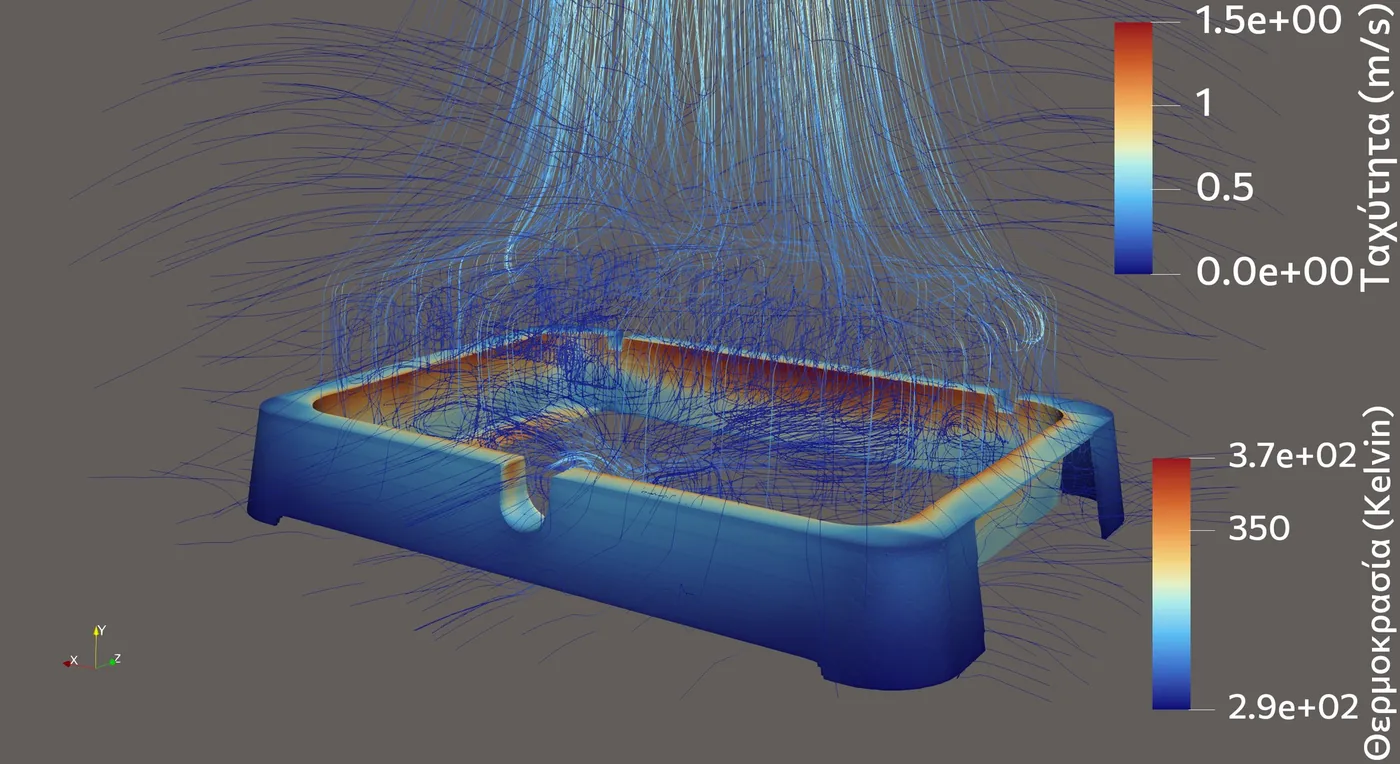
Temperature of a plastic base under a hot metal body, with air streamlines
The plastic base is hottest on the inner rim that faces the hot metal body; the outside stays close to room temperature.
Case study

A tabletop electric grill: plastic parts next to a 1200 W element.

A manufacturer was upgrading a grill with new parts in glass-filled polyamide (PA66-GF30), designed in 3D CAD and 3D-printed for the laboratory tests. Two questions: do the plastic parts stay within their limits, and why does the thermostat switch off later than expected?

Conjugate heat transfer

The model and what it showed

The grill on its table, inside a volume of room air, with the element, the stainless steel body, the thermostat and the plastic parts. Conduction, convection and radiation were solved together from a cold start for 40 minutes, until thermal equilibrium.

Findings
  • Of the 1200 W, 47 % leaves with the hot plume, 35 % is radiated to the room and 17 % goes into the table. The element gives 80 % of its power as radiation.
  • The air inside is strongly stratified: about 305 °C at thermostat height, 205 °C some 25 mm lower. A thermocouple reading depends on where it sits.
  • The thermostat tip settled 96 K below the mean air temperature: 82 % of the heat it picked up escaped by conduction to its outer part, in the room air.
  • With the real geometry, the open end of the thermostat socket sits 2.5 mm from the hot body and reached 172 °C, above the continuous-use limit of PA66-GF30 (about 120–140 °C).
Checked against the laboratory

On the exposed part of the thermostat, outside the grill, the model gave 117 °C and the laboratory measured 118 °C. That temperature depends on the whole heat path through the thermostat, so the agreement checks the model, not just one number.

Where model and measurement disagreed, the reason was found: the air thermocouple was touching the grill rack, which absorbs the element's radiation directly and is much hotter than the air.

What decides

Not the colours, but the heat paths: once it is known how the heat reaches a plastic part, it is clear which change is worth making.
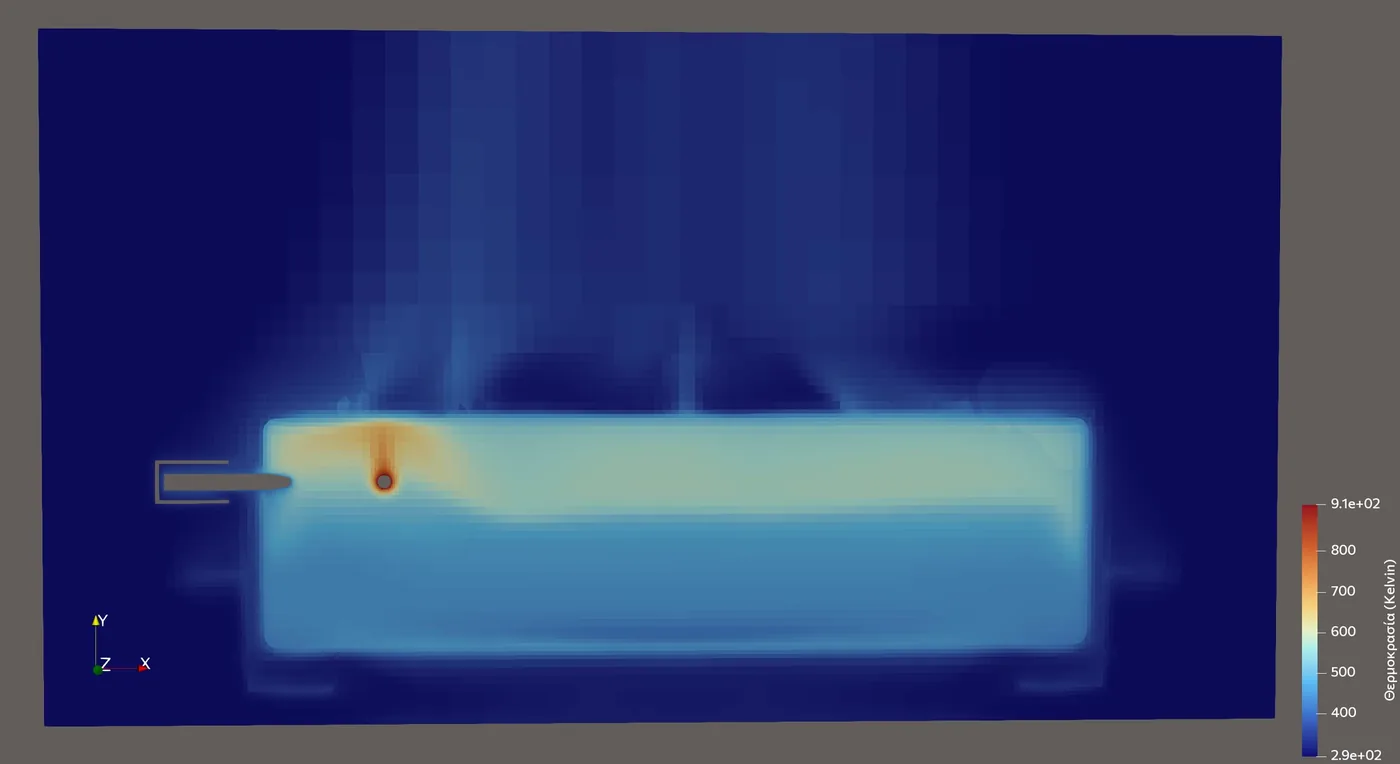
Air temperature on a vertical section through the grill and the thermostat
Air temperature on a section through the thermostat. The hot layer under the lid and the element, and the thermostat entering from the side wall.
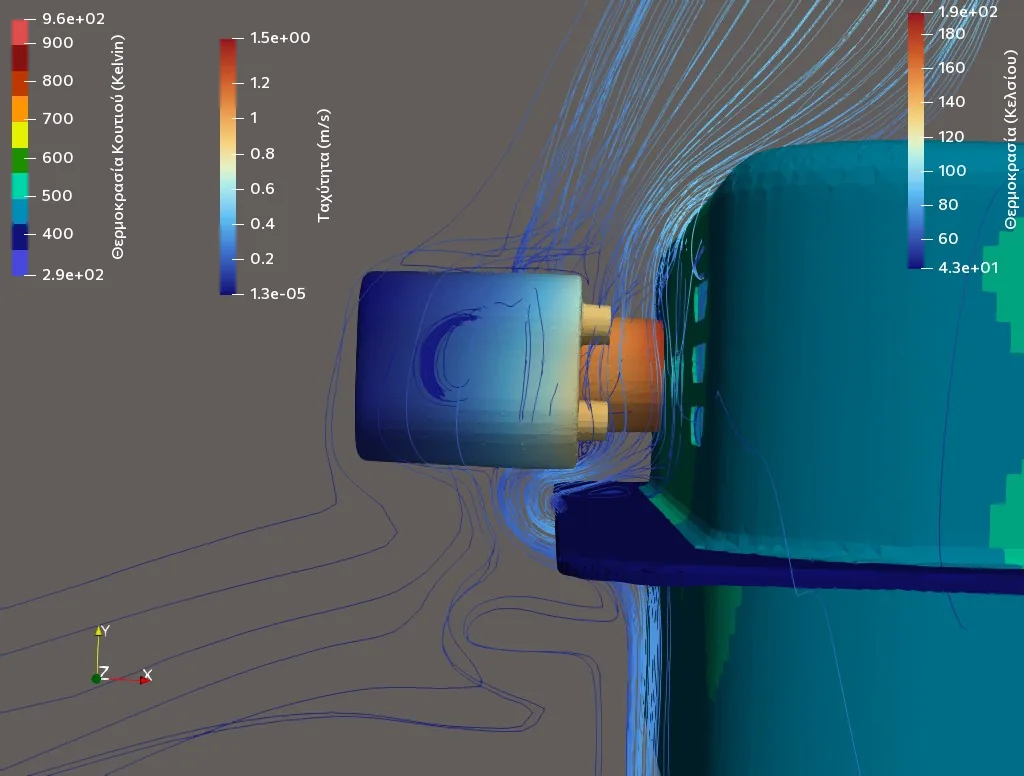
Thermostat socket at equilibrium, with air streamlines around it
The thermostat socket at equilibrium. Solid temperatures and the air flowing past it, in one model.
Design iterations

Four versions of the socket, before any mould

Each version was simulated to equilibrium and its heat flows compared with the previous one. The target: the PA66 body below 100 °C, without moving the thermostat tip into cooler air.

Version PA66 body, max Thermostat tip
Two-part socket on a metal bracket 198 °C 255 °C
Plastic separated from the metal, vent holes added 179 °C 255 °C
Socket and bracket moved outwards 156 °C 228 °C
Bracket outside the plastic parts 140 °C 226 °C
What each step taught
  • A higher-temperature plastic (PPS-GF40) next to the wall only moved the problem outwards: the metal bracket it holds stays hot, and so does the PA66 that touches it.
  • The bracket's temperature is set by the element ends it is attached to, not by the shape of the socket. It cooled only when it moved away from the wall, and that cost the thermostat 27 K.
  • In the last version heat reaches the PA66 mainly through thin air gaps around the element ends, about 1 mm wide.
The outcome

Each step lowered the PA66 by 16–23 K. The remaining 40 K led to two clear options for the client: make the body in PPS-GF40 as well, which already works below its limit, or ask the thermostat maker for its switching temperatures and a longer probe.

Limits

Material limits are typical datasheet values; the final assessment needs the data of the specific grade. The study is of the empty grill at full power, the worst steady state.

Open-source CFD

Professional flow analysis, without enterprise licence costs.

Commercial CFD packages often cost thousands of euros a year per seat, and that cost ends up in the price of every study. We work with a mature open-source toolchain instead, so an SME pays for engineering time, not for software licences.

The solver, OpenFOAM, is one of the most widely used CFD codes in industry and research: steady and transient, laminar and turbulent flow.

Honest about the limits

Where a question genuinely needs a feature that only a commercial package offers, we say so before the work starts.

The workflow

  1. Geometry: FreeCAD

    The fluid domain is built from the CAD model, with details removed where they don't affect the flow.

  2. Solution: OpenFOAM

    Physical models and boundary conditions are set, each assumption is recorded, and convergence and sensitivity are checked.

  3. Post-processing: ParaView

    Velocities and pressures are extracted and presented as streamlines, sections and figures for the decision.

This offering is not approved or endorsed by OpenCFD Limited, producer and distributor of the OpenFOAM software via www.openfoam.com, and owner of the OPENFOAM® and OpenCFD® trade marks. Other product names are trademarks of their respective owners.

Related projects

A real project.

CFD · Mechanical design

A hydroponic laboratory in a container

The airflow corrected with CFD before construction.
See the project

All projects: CFD

Do you have an engineering question? Let's discuss it.

Tell us what you are developing, changing or trying to fix. We first look at the engineering question, then say plainly what is worth doing: a calculation, a design review, a test, a simulation, or a combination.

Complimentary first site visit & analysis Custom proposal, regardless of project scale Strict confidentiality & NDA protection